
Wells Fargo Mobile® Deposit

Lights, camera, deposit
Get the Wells Fargo Mobile app to deposit checks from virtually anywhere.
How mobile deposit works
Get Started
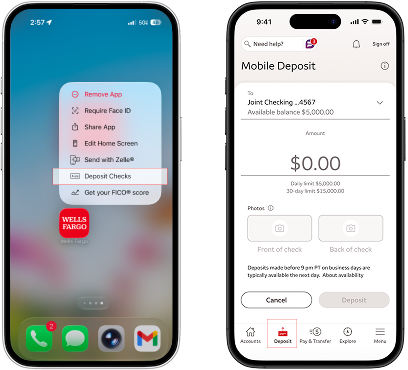
1. Download the Wells Fargo Mobile app to your smartphone.
2. Sign on to your account.
3. Long press the app to access the Deposit Checks shortcut.
4. Or, select Deposit in the bottom bar.
Select Account

1. Select an account from the To dropdown. If you have set up a default account, it will already be pre-selected.
2. If you want to create or change your default account, go to the Deposit to dropdown and select the account you want to make your default, then select Make this account my default.
Enter Amount

1. Enter the check amount. Your account’s remaining daily and 30-day mobile deposit limit will also display on the screen.
2. Make sure the amount entered matches the amount on your check, and select Done.
Take Photos

1. Sign the back of your check and write “For Mobile Deposit at Wells Fargo Only” below your signature (or if available, check the box that reads: “Check here if mobile deposit”).
2. Take a photo of the front and back of your endorsed check. You can use the camera button to take the photo. For best results, use these photo tips:
- Place check on a dark-colored, plain surface that’s well lit.
- Position camera directly over the check (not angled).
- Fit all 4 corners inside the guides on your mobile device’s screen.
Submit Deposit

1. Make sure your deposit information is correct, then select Deposit .
2. You’ll get an on-screen confirmation and an email letting you know we’ve received your deposit.
3. After your deposit, write “mobile deposit” and the date on the front of the check. You should keep the check secure for 5 days before tearing it up.
1. Download the Wells Fargo Mobile app to your smartphone.
2. Sign on to your account.
3. Long press the app to access the Deposit Checks shortcut.
4. Or, select Deposit in the bottom bar.
1. Select an account from the To dropdown. If you have set up a default account, it will already be pre-selected.
2. If you want to create or change your default account, go to the Deposit to dropdown and select the account you want to make your default, then select Make this account my default.
1. Enter the check amount. Your account’s remaining daily and 30-day mobile deposit limit will also display on the screen.
2. Make sure the amount entered matches the amount on your check, and select Done.
1. Sign the back of your check and write “For Mobile Deposit at Wells Fargo Only” below your signature (or if available, check the box that reads: “Check here if mobile deposit”).
2. Take a photo of the front and back of your endorsed check. You can use the camera button to take the photo. For best results, use these photo tips:
- Place check on a dark-colored, plain surface that’s well lit.
- Position camera directly over the check (not angled).
- Fit all 4 corners inside the guides on your mobile device’s screen.
1. Make sure your deposit information is correct, then select Deposit .
2. You’ll get an on-screen confirmation and an email letting you know we’ve received your deposit.
3. After your deposit, write “mobile deposit” and the date on the front of the check. You should keep the check secure for 5 days before tearing it up.
Mobile deposit is only available through the Wells Fargo Mobile® app on eligible mobile devices. Deposit limits and other restrictions apply. Some accounts are not eligible for mobile deposit. Availability may be affected by your mobile carrier's coverage area. Your mobile carrier's message and data rates may apply. See Wells Fargo’s Online Access Agreement and your applicable business account fee disclosures for other terms, conditions, and limitations.
Available balance is the most current record we have about the funds that are available for your use or withdrawal. It includes all deposits and withdrawals that have been posted to your account, then adjusts for any holds on recent deposits and any pending transactions that are known to the Bank. This balance may not reflect all of your transactions, such as checks you have written or debit card transactions that have been approved but not yet submitted for payment by the merchant.
Availability may be affected by your mobile carrier's coverage area. Your mobile carrier's message and data rates may apply.
Android, Google Play, Chrome, Pixel and other marks are trademarks of Google LLC.
Apple, the Apple logo, Apple Pay, Apple Watch, Face ID, iCloud Keychain, iPad, iPad Pro, iPhone, iTunes, Mac, Safari, and Touch ID are trademarks of Apple Inc., registered in the U.S. and other countries. Apple Wallet is a trademark of Apple Inc. App Store is a service mark of Apple Inc.
Wells Fargo Bank, N.A. Member FDIC.
DT1-10232027-12-9160098-1.1
